Validated is different
from compatible.
Which cameras and files work, and how much of that has been checked. Only tested results are listed here.
What the words mean.
- Validated
- The conversion was checked on real negatives scanned with that camera.
- Compatible
- The file opens and converts. Its color hasn’t been checked camera by camera.
- Not tested
- We haven’t tried it. It may work: tell us.
How the conversion works, and how color is checked: built for the negative.
By camera.
What EmulLab 0.9.1 does with each camera or kind of scan. Updated with each version.
| Camera or source | Opens and converts | Color | USB capture | Live view |
|---|---|---|---|---|
| Nikon Z 9NEF files | Yes | Validated | Yes, to the computer or the card | Beta |
| Other camera RAW files | Compatible | Not checked camera by camera yet | Not tested: depends on the camera | No: Nikon Z 9 only |
| Flatbed and lab scansTIFF, JPEG, PNG | Yes, as positives | Kept as scanned: not inverted or rebalanced | Doesn’t apply | Doesn’t apply |
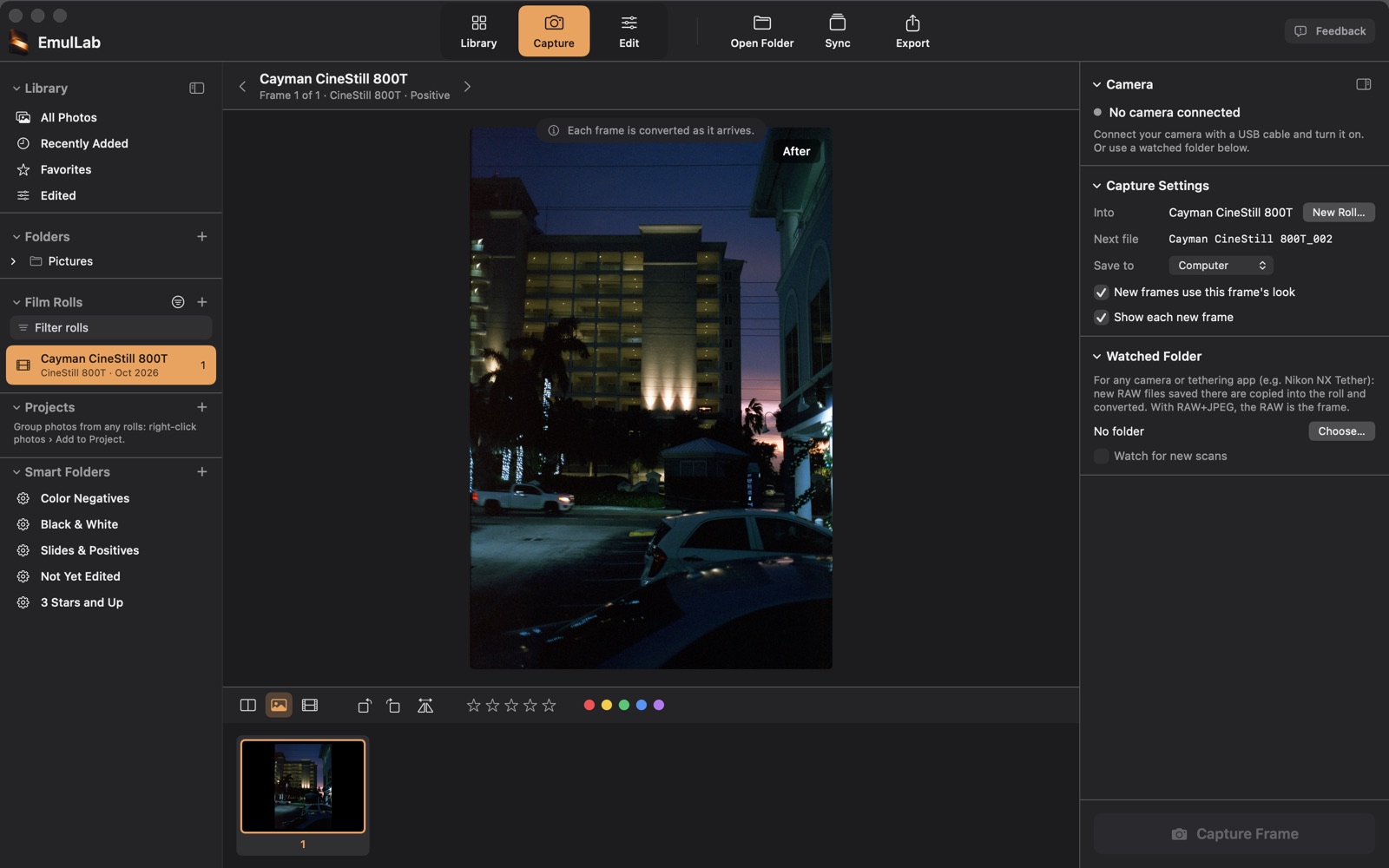
- USB capture. In Capture, a connected camera’s name appears under Camera, with a green dot when EmulLab can fire it. Save To Computer puts each picture straight into the roll, with no card: this works with Nikon cameras (tested on the Z 9). Other makes save to the card first, then the picture is copied in.
- Any camera. A watched folder brings in the RAW files another tethering app saves, such as Nikon NX Tether, and converts each as it arrives.
- Live view is an early test feature. It works only with the Nikon Z 9, the one camera it was tested on, and may change. It’s the camera’s preview, not the converted RAW.
Files that open.
Camera RAW files by maker, plus scans. Opening is the start: only the Nikon Z 9’s NEF files are validated.
- Nikon
- NEF, NRW
- Canon
- CR3, CR2, CRW
- Sony
- ARW, SRF, SR2
- Fujifilm
- RAF
- OM System and Olympus
- ORF
- Panasonic
- RW2
- Pentax
- PEF, DNG
- Leica
- DNG, RWL
- Samsung
- SRW
- Hasselblad
- 3FR, FFF
- Phase One
- IIQ
- Leaf
- MOS
- Mamiya
- MEF
- Kodak
- KDC, DCR
- Epson
- ERF
- Minolta
- MRW
- Other DNG files
- From cameras and converters, except merged and JPEG XL DNGs (below)
- Scans
- TIFF, JPEG and PNG, from a flatbed, SilverFast or a lab scanner
A file opens when the RAW reader in this version knows its camera, so a camera newer than EmulLab 0.9.1 may not open yet: see below.
Known limits.
- Merged and JPEG XL DNGs don’t open yet: DNGs merged from several shots (HDR or panorama, such as Lightroom’s merges) or saved with JPEG XL compression. Use the original RAW files.
- Sigma X3F files don’t open.
- A camera newer than this version may not open. If its files open in other apps, save one as a 16-bit TIFF in the camera maker’s software, open that, and tell us the camera.
- Very large flatbed scans need a lot of memory while they’re open and while they export: about 8 GB for a 156 MP scan.
- USB capture with other cameras isn’t tested. If a camera connects but can’t be fired from EmulLab, shoot on the camera, or use a watched folder.
Everything else that doesn’t work well yet: known issues.
Tell us about your camera.
A camera that works, or one that doesn’t: either is worth a short report.
- In EmulLab, choose Help › Send Feedback, or click Feedback in the toolbar.
- Set Area to Camera Compatibility, or Capture / Tethering for USB capture.
- Name the camera and its RAW file type, and say what happened: whether the files open, how the color looks, and whether Capture Frame fires the camera.
- Click Send by Email. The report opens in your own email app, so you can read it before you send it.
Photos are never attached to a report. For a RAW file that won’t open or converts badly, email support@emullab.com and say which camera made it. If we need the file itself, we’ll ask: most RAW files are too large for an email.
Email about a cameraThis page describes EmulLab 0.9.1 (Public Beta), released October 9, 2026. Updated with each version.